Azure Functions Triggers and Bindings - Part 1 - Queue
This is part 1 of the Azure Functions Triggers and Bindings series where Triggers and Bindings are explored with C# examples. In this post, Azure Queues are explored with In-Process and Isolated Functions.
Triggers and Bindings
There are 2 use cases that we can take advantage of when dealing with Azure Queues1 on Azure Functions:
- Listen to queues with
QueueTrigger, applied to both In-Process and Isolated models. - Save messages to the queue with
QueueandQueueOutput, an output binding applied to In-Process and Isolated models respectively.
Both triggers and bindings are explored below with In-Process and Isolated model examples. Both bind to types from the NuGet package Azure.Storage.Queues, with slightly different implementations.
Triggers
A single trigger QueueTrigger is available in both implementations.
In-Process Triggers
The In-Process model leverages the NuGet package Microsoft.Azure.WebJobs.Extensions.Storage, version 5.0.1 (currently).
Trigger.cs
| |
Isolated Triggers
The Isolated model leverages the NuGet package Microsoft.Azure.Functions.Worker.Extensions.Storage, version 5.0.1 (currently).
Trigger.cs
| |
Testing Triggers
To validate the triggers, either start the In-process or Isolated model, then submit a message to the queue by using Azure Storage Explorer.
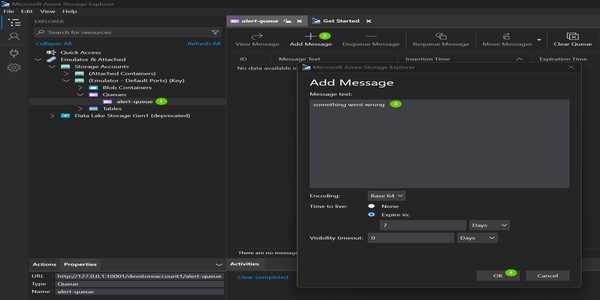
- Create the queue
- Click to add a message
- Type the message text
- Click OK to add the message to the queue
This should trigger the QueueTrigger functions.
Bindings
There is only a single binding with queues, the Output Queue.
We make use of an HttpTrigger only to exemplify the output queue.
In-Process Bindings
Output.cs
| |
Isolated Bindings
Output.cs
| |
Testing Bindings
Submit a POST request to validate the binding. This is possible because we are using the HttpTrigger here:
| |
If you have a breakpoint on the function Trigger, you’ll notice that it also gets triggered, as it listens to the queue alert-queue, which was just populated with the output binding.
The examples are available on PlayGoKids repository.
More posts will come to exemplify other Triggers and Bindings available in Azure Functions. Stay tuned.
Join the conversation! Share your thoughts and connect with other readers.